
Item status labels
A save that is ready has no label in the feed. A label, also called a pill, shows only when an item is still working or needs something from you. This page lists every label, what it means and what to do.
Labels in the feed
| Label | What it means | What to do |
|---|---|---|
| Queued | Lazy Reader is reading the page and writing the summary. This usually takes about a minute. | Nothing. The label goes away when the summary is ready. |
| Stuck | The item has been queued for more than 5 minutes with no answer. | Open it and press Try again. |
| Needs a key | There is no key to do the work. Most often your OpenRouter key is missing. For an Instagram link, the SociaVault key is missing. | Open the item and press Go to Settings, then add the key. The item is summarized once a key that works is saved. |
| Waiting for full text | The page is behind a paywall or a login, so the server only saw a preview. Lazy Reader never summarizes a preview. | Keep the Chrome clipper installed and Chrome open. It reads the page with your own sign-in and finishes it. See Finish waiting saves. |
| Waiting for transcript | YouTube did not let the server read this video. | Open Lazy Reader on your iPhone. The app fills in the transcript. |
| Members only | Your computer could only get the preview too. You may not have access to the full article. | Sign in to the site in Chrome, then press Try again on the item. |
| Couldn't open | Your computer could not open the page at all. | Press Try again, or Open link to check the page yourself. |
| Failed | Something else went wrong. The item page says what. | Open the item. Press Fix it in Settings if it is a key problem, otherwise Try again. |
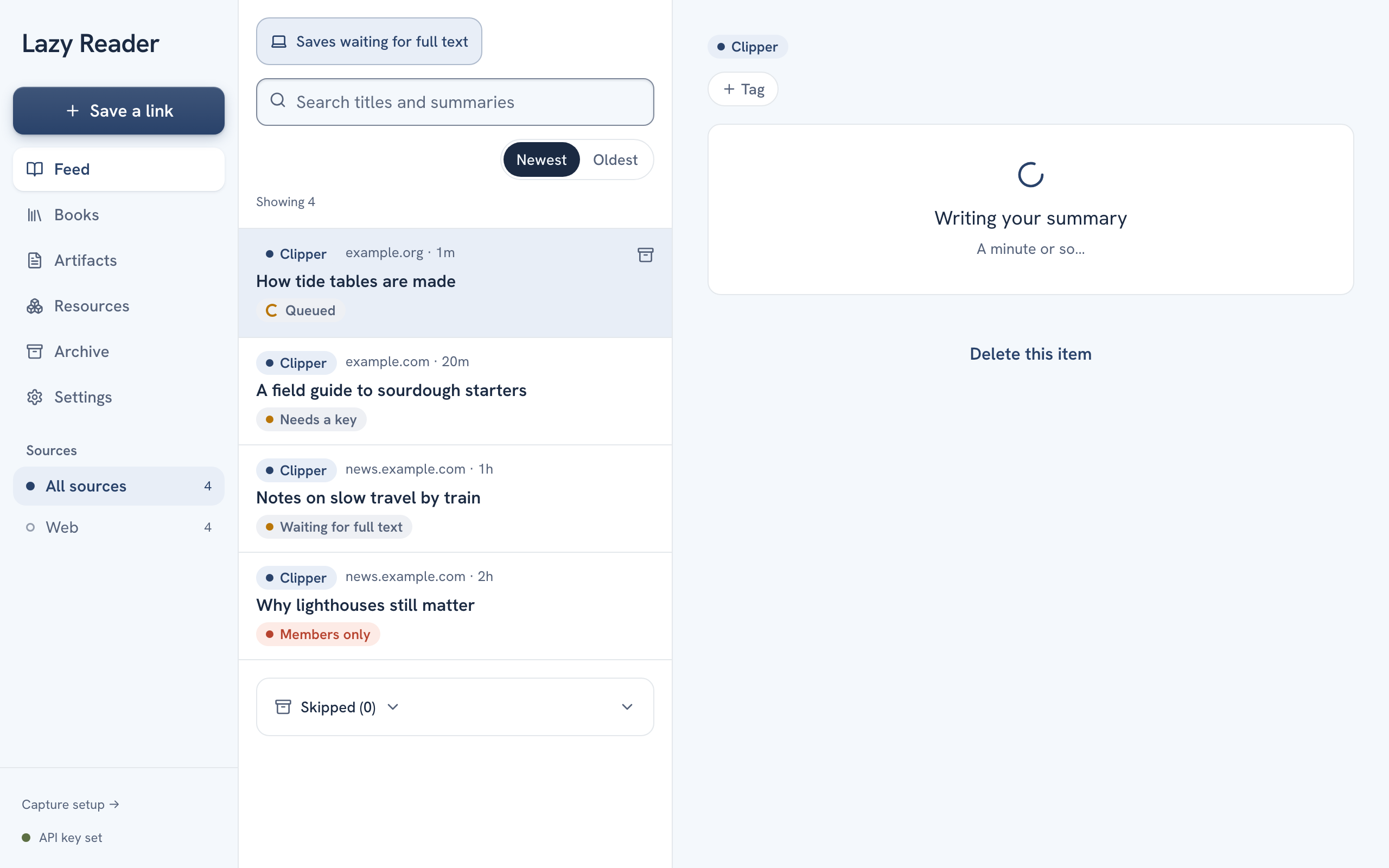
What the item page says
When you open an item that has a label, the space where the summary goes explains the state.
| You see | Meaning |
|---|---|
| "Writing your summary" and "A minute or so…" | Queued. Wait a moment. |
| "This is taking a while" with Try again | Stuck. |
| "Add your OpenRouter key in Settings to get summaries." with Go to Settings | Needs a key (OpenRouter). |
| "Add a SociaVault key in Settings to read Instagram posts." with Go to Settings | Needs a key (Instagram). |
| "Waiting for full text" and See everything that is waiting | The Chrome clipper finishes it within a minute while Chrome is open. |
| "Waiting for transcript" | Open the iPhone app. |
| "Couldn't summarize" with the reason | Failed. The reason is in plain words, for example "Your OpenRouter account is out of credit." |
Key problems
These show as Failed in the feed. The first four also get a Fix it in Settings button. Once you save a key that works, Lazy Reader puts those items back in the queue by itself.
| Message | Fix |
|---|---|
| "Your OpenRouter key isn't working. Fix it in Settings › AI model." | Paste a new key in AI model. |
| "Your OpenRouter account is out of credit. Add credit at openrouter.ai, then try again." | Add credit on openrouter.ai. |
| "Your SociaVault key isn't working. Fix it in Settings › Capture › Instagram." | Paste a new key in Capture, Instagram. |
| "Your SociaVault account is out of credit. Add credit at sociavault.com, then try again." | Add credit at sociavault.com. |
| "Instagram didn't let us read this post. Your key is fine. Try again later." | Wait, then press Try again. |
Labels on books
A book being summarized shows its own label in the feed and on the Books tab.
| Label | Meaning |
|---|---|
| Getting started (Books tab) or Summarizing (feed) | The book was just added. |
| 3 of 20 chapters | How far the summary has got. |
| Waiting for the book before it (Books tab) or Waiting for another book (feed) | Another book is being summarized first. |
| Stopped. Open it to retry | Something went wrong. Open the book and press Retry. |
TIP
The Waiting page collects every save that needs you in one list: Needs your key, Waiting for full text, Couldn't open and Members only. Open it from Settings, Capture, Waiting saves, or from the Saves waiting for full text link on the feed.
Related pages: A save has no summary, A page stays waiting.