Worth it and Archive
When you are done with a save, you clear it from the feed. There are two ways to do that, Worth it and Archive. Both take the item out of the feed and keep it. The only difference is what Lazy Reader remembers about it.
| Button | Leaves the feed | Kept on the Archive page | Remembered as |
|---|---|---|---|
| Worth it | Yes | Yes, under Worth it | Worth your time |
| Archive | Yes | Yes, under Archived | Nothing more |
| Delete | Yes | No | Gone for good |
Use Worth it for the saves you were glad to read, the ones you might go back to. Use Archive for everything else: read and done, or not for you after all. Neither choice is final. You can always bring an item back.
Where the buttons are
- In an open item, at the bottom: Worth it (filled) and Archive (outlined), with the open original icon next to them. In the iPhone style look they sit in a toolbar with Open, Share and Delete.
- On a phone, in the feed: swipe a row right for Worth it, or left for Archive.
- On a computer, in the feed: each row has an Archive button.
After either one, a message appears for a few seconds: "Saved as worth it" or "Archived". Press Undo to put the item straight back in the feed, or View to open the Archive page.
The Archive page
The Archive page lists everything you cleared, the most recently cleared first. Open it with Archive in the sidebar on a computer, or the Archive button at the top right of Feed, Books or Artifacts on a phone.
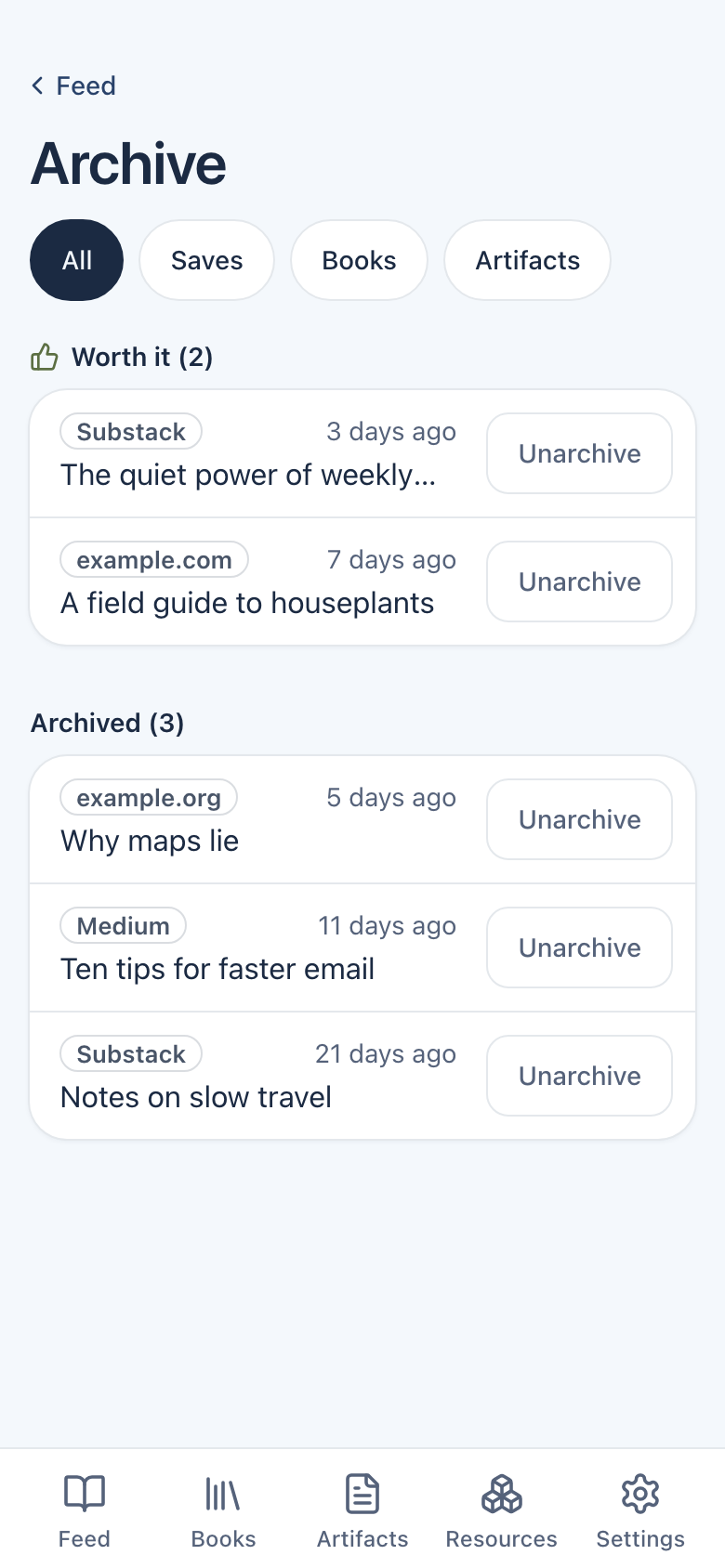
- Chips at the top filter by kind: All, Saves, Books, Artifacts.
- Worth it (N) comes first, then Archived (N).
- The model skipped (N) appears only for imported links the model left out. Its rows have Move to feed. A link you save yourself always gets a summary, so it never lands there.
Each row has Unarchive. Press it and the item goes back where it came from, with a short message and Undo. Tap the row itself to open the item and read it again.
Books and artifacts
Books and artifacts have an Archive button too, at the bottom of the open book or document. There is no Worth it for them. The message then says "Moved to Archive". They show on the Archive page under the Books and Artifacts chips.
Delete is different
Delete this item, at the very bottom of an open item, or Delete in the swipe tray, removes the item and its summary for good. Lazy Reader asks first ("Delete this item?"), and there is no undo. If you might want it again, use Archive.
See Clear your feed and Find and restore archived items for the steps.